Ecommerce Migration Strategy: A Step-by-Step Guide to Successful Platform Upgrades
Application Migration
E-commerce development


Looking to upgrade your platform with a clear eye on ROI? You’re in the right place. This article breaks down the full anatomy of ecommerce replatforming — from the hidden bottlenecks to the best practices. You’ll also find stats from real brands that made the leap and lived to tell the ROI story. Need tailored insights grounded in your analytics? The IntexSoft team can walk you through every data point.
Reading time: 25 min.
Deciding to replatform your ecommerce site is never effortless—but it’s one of those calls that defines whether your business keeps growing or quietly stalls.
Swapping ecommerce software sounds simple—until you realize it’s actually brain surgery for your business. Ecommerce replatforming means gutting your old backend, rethinking data pipelines, and redesigning every digital artery of your store. Do it right, and your team walks away with something priceless: freedom at scale. Faster rollouts. Smarter automation. Competitive velocity your legacy system could only dream of.
In the early days, replatforming barely made the meeting agenda. It was maintenance, not mission-critical. Today, that idea is obsolete. Ecommerce is no longer a product catalog online—it’s a living, data-driven organism. The statistics from the International Trade Administration below prove this fact.
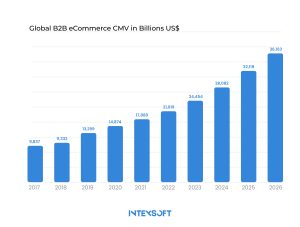
The key is real-time adaptation. Systems that can’t evolve at such a pace? They will be fossils before the decade’s out.
If you’ve been running your site for the last five years (or longer) on legacy software, you already know the curveballs. When your integrations start breaking, updates take forever, and customers move on, it’s a wake-up call. You can keep patching things—or invest in a solid replatforming strategy that pushes your business forward.
For B2B companies, the crossroads is here. Clunky, outdated tech stacks are strangling agility and scalability, leaving firms scrambling to deliver the tailored, self-serve solutions customers expect in 2025’s digital race. And with all of that, you have a year of “transformation” ahead—an intensive period of planning, migration, testing, and training that determines whether your new platform becomes your biggest growth driver or your most expensive lesson.
Based on IntexSoft’s experience leading ecommerce transformation projects, the real question isn’t whether to replatform—it’s how to do it early on with the most benefit.
Digital Commerce 360’s latest numbers reveal the shift in motion: 76% of B2B sellers and over a quarter of retailers are plotting their next platform move. The reason? Standing still costs more than evolving. And executives know it.
Why these moves matter:
| Practice | What It Means (IntexSoft Take) | Why It Matters | Pro Tip |
| Create an Effective Communication Plan Across Teams | Treat communication as infrastructure. Status syncs, risk alerts, and clear ownership loops keep chaos at bay. | Teams move faster—and fix issues earlier—when everyone speaks the same language. | Appoint “migration champions” in every department. They’re your eyes and ears. |
| Define a Comprehensive Data Migration Strategy | Know your data. Map what stays, what goes, and how it transforms. Clean before you move. | Bad data poisons even the best platform. Smart strategy means clean launches and faster validation. | Run test migrations on subsets first. Find cracks before they widen. |
| Develop a Detailed End-to-End Project Plan | Timelines, dependencies, contingencies—it’s the migration GPS. Every step documented, no surprises. | Without structure, migrations collapse under scope creep and missed deadlines. | Build rollback checkpoints into every major milestone. |
| Select the Right eCommerce Migration Approach | Big-Bang, Phased, or Hybrid. Choose your pattern based on complexity and risk tolerance. | The wrong approach can wreck customer experience. The right one sustains uptime and ROI in ecommerce. | If possible, go phased. Real users test real systems better than QA labs. |
| Migrate Only Essential Data and Maintain Backups | Every gigabyte counts. Keep it lean, clean, and backed up in triplicate. | Over-migrating adds cost and chaos. Losing data adds challenges. | Keep backups live throughout the process—versioned, encrypted, and tested. |
| Leverage Customer Feedback to Guide Improvements | Real feedback beats assumptions. Let customers stress-test your shiny new platform. | What users feel is what drives conversions. Feedback loops sharpen UX and retention. | Track metrics in real time. Shadows over performance show up fastest in behavior data. |
Migration is a system that’s evolved (and is still evolving). The brands that thrive don’t treat it as a one-off. They run migration like a product: iterative, measurable, and constantly improved. In tandem, teams who keep feedback loops open are the ones enabled to do so sustainably.

Ecommerce migrations can make or break your growth strategy. Want ROI instead of regret? Expose every assumption to the light. Here are the key areas your team should consider, plus real examples and proven insights from successful transitions.
Your migration will ripple outward: sales, traffic, UX, retention. First, we model how platform migration might affect session volume, conversion rates, and downtime. Our experts simulate disruption windows and buffer impact. In many migrations we’ve seen, poor planning costs 5–10% of monthly revenue in a “go live” surge week. The question: Can you absorb that or spread it out?
You must prioritize preserving brand trust and continuity. Any stumble in checkout, page performance, or search flow shadows over your gains like a cloud—usually it costs orders and credibility.
You’ll need to budget for integrations, maintenance, updates, security, and compliance. Data cleanup alone can cost $15,000–30,000 per year if ignored.
We build full lifetime cost curves—not just the “in year one” cost. You’ll know ongoing hosting, patching, scaling, developer hours, and profitability. Without this visibility, many migrations turn into financial traps.
Your legacy stack doesn’t vanish magically. The smartest companies know the real efficiency boost comes from syncing ERPs, CRMs, inventory, logistics, and POS into a single, connected system. In many migrations, missing integration points become critical failure zones. We inventory every API, plugin, and custom extension, and detect gaps ahead of time.
IntexSoft looks for adapters that future-proof expansions, so the system remains modular and composable. That way, your new platform can evolve in ways that deepen your ecosystem, not force constant rebuilds.
Even the best platform fails if it outpaces your team’s capability. In IntexSoft‘s experience, migration projects stall when teams lack cross-domain skills: data engineers, DevOps, frontend, QA, and SEO.
We assess your team’s capacity and match them with engineers who’ve built migrations before—people who understand that migration is part engineering, part strategy, part crisis management.
What features will you actually use? A bloated roadmap is worse than a minimal one. You need features that solve real problems—catalog management, efficient fulfillment workflows, native marketing tools, and automation.
Pick a platform that supports exactly those capabilities, not everything. The right fit ensures you don’t overpay or overbuild for features you never activate.
Markets shift, customer expectations change. Your new platform must scale—not just in traffic, but in feature set, internationalization, integrations, modular services.
We design with headroom. As your business evolves, the system must bend, not break. The thinking is long-term: you set up for today’s goals, but guarantee that the foundation holds strong for tomorrow’s expansions.
When things break—and they will—you want a system backed by responsive support: live chat, helpdesk, documentation, SLAs. Migration isn’t done when you launch. Support is never optional.
Choose a platform whose service model matches your urgency threshold. A glitch during peak hours without support costs far more than any upgrade.

If you’ve been in the digital commerce space long enough, you know that not all platforms are created equal. Choosing the right one is a balancing act—between control and convenience, cost and capability, short-term fixes and long-term growth. In our experience, the real difference isn’t just about what a platform does today, but how it performs under pressure when your traffic spikes or your catalog scales. The choice shapes your ROI for ecommerce, namely how efficiently you turn digital investment into measurable returns—not just in year one, but across the next five.
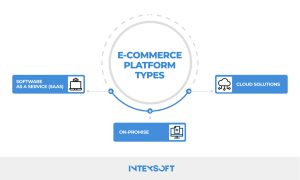
Here’s how the three top ecommerce platform models stack up against each other.
Shopify. BigCommerce. Adobe Commerce Cloud. The SaaS crowd has turned ecommerce into something that feels more like streaming a service than managing one. No patching servers, no panicked downtime alerts. Your provider handles the oil changes: hosting, updates, and uptime.
SaaS can (or should) be your launchpad if your priority is agility—not full technical autonomy.
On-premise systems like Magento Open Source or legacy IBM WebSphere setups are the old guard of ecommerce architecture. They give enterprises deep control over every line of code, every database, every plugin. That control, however, comes with responsibility—and expense.
The ROI story here is nuanced. Sure, on-premise looks pricey on paper. But when your stack is built around specialized integrations, that investment buys years of control and resilience.
Here’s where the future gets built. Cloud-native, headless setups like commercetools and Elastic Path merge SaaS ease with the creative freedom of custom builds. By splitting the frontend from the backend, teams unlock a new door of control and experimentation.
In the modern landscape, cloud platforms deliver what most teams crave: flexibility without fragility. You can adapt faster, iterate safely, and—most importantly—align every tech decision with your broader business objectives.
Replatforming your ecommerce operation isn’t a weekend project. Done wrong, it can feel like putting all your digital eggs in one basket and watching them roll away.
So, the key is structure. You need a roadmap that balances precision with adaptability, strategy with speed.
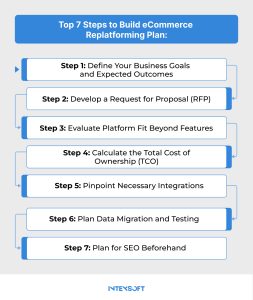
Take a look at the key steps behind building a truly smart ecommerce replatforming plan.
Ecommerce platform migration is a business reboot. Before you even start comparing vendors or frameworks, zoom out and define why you’re doing it:
Especially if you run a fast-scaling ecommerce operation, clarity here is everything. Start by listing where your current system fails—what’s costing you time, revenue, or growth. Maybe integrations keep breaking. Maybe your checkout flow leaks conversions. These pain points are signposts for what the new platform must solve.
In a remarkably short window, e-commerce has transformed. What used to be slow, cumbersome architecture has evolved into fast, adaptive, API-first systems. The advent of headless commerce changed the power dynamics. And, importantly, these shifts have made replatforming less of a maintenance chore and more of a creative reset button for digital businesses.
Here’s the thing about ecommerce replatforming: the smartest companies don’t get dazzled by feature lists—they look for fit. Your platform should sync with how your business actually runs, not just how a demo looks. And if you’ve ever gone through ecommerce product data migration, you already know how easily “nice-to-have” tools can become digital dead weight once real data and real customers hit the system.
First, they tend to be more than just platforms—they’re partners in scale. The best solutions adapt to complex pricing structures, multiple buyer roles, and account-based workflows without breaking your tech stack. That’s where dexterity matters: your next platform should flex to your business model, not the other way around.
An ecommerce replatforming checklist helps, sure—but the real insight comes from the questions you ask:
Because in today’s market, businesses that pick with purpose—not panic—can be better equipped to conquer what comes next.
Here’s the truth about the third step: what looks affordable at first can quickly become a money sink. The hidden costs — maintenance, upgrades, downtime — are what really shape your bottom line.
The challenge is that too few companies know how to look beyond the subscription line item. Real TCO means calculating everything—licensing and hosting fees, data migration, third-party integrations, staff training, and the inevitable disruptions that come with the switch.
On modern SaaS platforms, many of these expenses are truly predictable. But if you’re venturing into a custom or on-premise setup, expect higher overhead over time. You’re paying for flexibility—but also for complexity.
A smart ecommerce migration strategy models the total cost of ownership across at least three to five years, not just year one. Because the truth is, those early savings can evaporate fast when upgrades, API changes, or new compliance rules kick in.
And with all of that, you have a year of “transformation” ahead that could open you up to threats (both old and new)—from downtime risks to security gaps. So don’t just chase what looks lean. Build for what’s sustainable.
When it comes to ecommerce data migration, integrations are where the real test begins. B2B ecosystems are rarely neat—they’re a maze of ERPs, CRMs, pricing engines, and customer portals trying to talk to each other. You demonstrate authority by knowing which of those systems truly drive value—and which just slow you down.
Avoid the platforms that promise simplicity but deliver lock-in. Not the version where everything works perfectly in a demo, then collapses under real workflows. Look instead for modern, API-first architectures built by people who’ve been where they are—companies that outgrew rigidity and built flexibility in. Maybe you do the same.
Timing matters. Big time. Every ecommerce migration guide says to plan ahead—but few emphasize when. Avoid high-traffic months, big promotions, or holiday sales. Choose a slow period instead. That gives your team time to test, train, and make fixes before customers notice.
Move section by section. If you launch one category or region at a time, you reduce risk and keep operations running smoothly. Once the switch is complete, stay focused. Keep checking data, customer feedback, and conversions. Because even after launch day, your job isn’t done.
When you’re deep in an ecommerce site migration, the danger is invisibility. Search rankings can vanish overnight, data can fracture, and customers can feel like strangers in a place they once knew. The trick is to plan like a strategist, not just a technician.
Use SEO tools like Ahrefs and Semrush to benchmark performance before and after the switch, watching closely during the first 30 to 60 days. These are your early warning systems, your champions in spotting what’s broken before customers do.
Very broadly, we’d say most ecommerce migration projects stumble not because of bad technology, but because of a blurred strategy. Teams underestimate the complexity of their own data or skip the architectural groundwork for the new environment. The result? Lost time, lost trust, and lost ROI in ecommerce.
At IntexSoft, we’ve seen what separates success from burnout. The winning teams take the “walk” stage seriously: they build a comprehensive data inventory, map dependencies, and define what the new system should actually deliver—schema, location, access, metadata, the works. Once you’re enabled to do so, the migration shifts from chaotic to coordinated.
The good news? Ecommerce migration doesn’t have to be an issue. Replatforming is like swapping engines mid-flight. But with a sharp strategy, that turbulence turns into lift—fueling agility and ROI long past takeoff.
Are you wondering how to make that leap without losing sleep or customers? Our experts would love to help. Reach out to IntexSoft anytime. The consultation’s free. The insight is invaluable.


This article highlights the top 10 eCommerce development companies to watch in 2026 across the U.S. and Europe.

Blockchain technology is revolutionizing the ecommerce industry, providing increased security, transparency, and efficiency for online transactions. In this article, we discover how businesses are leveraging blockchain to streamline operations and build trust with customers.

Learn about the benefits and challenges of migrating from a monolithic e-commerce platform to a headless architecture. Discover how this transition can improve flexibility, scalability, and overall customer experience.